Photoshop, Wood, and Text
April 26th, 2007 by SteveHere are a few things you can do in Photoshop with text on a wood background. First, create a new document and fill with the wood texture of your choice. Next, add your text or logo using black text (I used the typeface Comic Sans).

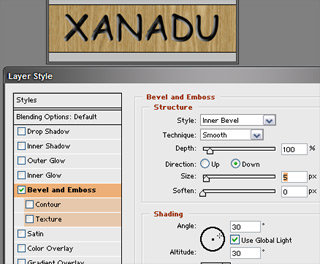
One thing you can do is use an inner bevel to give it a carved or engraved sort of look:
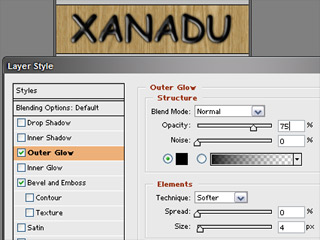
To make it look branded or burnt, add a dark outer glow:
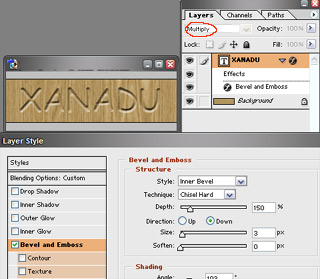
Or, if you want to go for a more carved look, use an inner bevel with the text layer set to “multiply” so that the wood background shows inside your text:
Posted in | 15 Comments »
February 7th, 2013 at 12:50 pm
“xanadu-fx.com ? Blog Archive ? Photoshop, Wood, and Text” was in
fact a great article. If merely there were considerably more weblogs similar to this specific one
on the online world. At any rate, thanks a lot for your precious time, Lola
February 16th, 2013 at 10:06 am
Hurrah! Finally I got a blog from where I be capable
of truly take useful information regarding my study and knowledge.
October 17th, 2013 at 4:24 pm
Live by the beach, go scuba diving when you want to, and spend your evenings grinding out your online living.
Niche marketing is at its profitable best when you display the knack for
making business decisions quickly. To get ideas about informative articles, you should type your niche on Google and take
a search.
January 27th, 2014 at 11:25 am
It’s very trouble-free to find out any matter on
web as compared to books, as I found this post at this website.
Also visit my page – Leonida
February 26th, 2014 at 11:38 am
I am really impressed along with your writing talents and also with the
structure for your weblog. Is that this a paid
theme or did you modify it yourself? Either way
stay up the nice high quality writing, it is rare to
look a nice weblog like this one today..
June 10th, 2014 at 8:21 am
This post will help the internet viewers for building up
new web site or even a blog from start to end.
January 30th, 2015 at 7:14 am
After looking over a few of the articles on your web page, I seriously appreciate your technique of writing a blog.
I bookmarked it to my bookmark website list and will be checking back
soon. Take a look at my web site as well and tell
me how you feel.
September 11th, 2015 at 2:50 am
Especially for a person who does not follow football as religiously, it could be quite tedious for
you to merely evaluate the right kind of shoes for your kid.
We all know the world’s best football players are courted by the football boot manufacturer’s; they send them free samples,
pay them astronomical fees to tie them into contracts to wear their footwear, and the players happily sign-up.
Football greats like Ronaldo of Brazil are remembered by their numbered jerseys.
December 3rd, 2015 at 6:05 pm
Article Source: Brown is an Expert Author and Director of Website
– Direct, a full service Las Vegas Website Design and Online Lead Generation Company.
The incredible features of flash designs make them highly functional.
Often, because of the many expert minds behind Drupal programs, these problems are
minimal, but they are there.
December 19th, 2015 at 7:25 pm
This means that things that used large amounts of money required
can be done now with much smaller amount of money and time.
Like everything in business is important, getting a website is important too.
Choosing among these vast numbers of provider is not so easy.
February 10th, 2016 at 10:03 pm
Excellent weblog here! Additionally your site
so much up fast! What web host are you the usage of? Can I
get your associate hyperlink on your host?
I desire my web site loaded up as fast as yours lol
November 30th, 2016 at 12:20 pm
Thanks for posting this awesome article. I’m a long time reader but
I’ve never been compelled to leave a comment.
I subscribed to your blog and shared this on my Facebook.
Thanks again for a great post!
May 11th, 2019 at 1:43 pm
We absolutely love your blog and find nearly all of your post’s to
be exactly I’m looking for. can you offer guest writers to write content available
for you? I wouldn’t mind creating a post or elaborating on a
lot of the subjects you write concerning here. Again, awesome site!
July 28th, 2019 at 11:36 am
This site is my inhalation, rattling good layout and Perfect subject material.
August 10th, 2019 at 5:09 pm
If you could start with $1 and make up to $10K a month, would
you do it?
No Experience Necessary!
No Gimmicks, Just A Solid Opportunity!?
Yes We Are Global https://www.bestmakemoneyfast.com